通过预定义颜色查找表上色
开发环境:
Windows 11 家庭中文版
Microsoft Visual Studio Community 2019
demo解决问题:通过颜色查找表给vtkPlaneSource上色
第一种技术是使用预定义颜色的查找表
vtkLookupTable。这包括创建一个查找表并为其分配一组已命名的颜色。命名的颜色是预定义的,任何其他需要的颜色都会根据需要生成。然后使用查找表中的颜色创建单元格数据。演示的第二种技术使用的是由颜色传递函数
vtkColorTransferFunction生成的查找表vtkLookupTable。在这种情况下,颜色传递函数用于在查找表中创建颜色范围。色彩传递函数定义了发散色彩空间中从绿色到棕褐色的过渡。生成的颜色随后用于创建单元格数据。
显示结果显示了由两个查找表着色的平面中的单元格。此外,代码还从文件中读取了相同的多面体数据,以证明结构是相同的。输出包括颜色信息和为单元格分配颜色的过程。
总之,代码展示了为 vtkPolyData 结构中的单元格分配颜色的两种技术,提供了一个使用预定义颜色和通过颜色转移函数生成颜色的清晰示例。
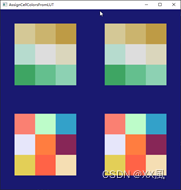
prj name: AssignCellColorsFromLUT
cpp
/*
演示如何使用查找表为 vtkPolyData 结构中的单元格分配颜色。
 查找表为 vtkPolyData 结构中的单元格分配颜色。
演示了两种技术
1) 使用预定义颜色查找表。
2) 使用由颜色传递函数生成的查找表。

显示结果的左侧列显示了平面中的单元格
在右边一栏中,显示的是在两个查找表中着色的平面中的单元格,在左边一栏中,显示的是在两个查找表中读取的相同
从文件中读入的多边形数据,表明两者的结构完全相同。
结构完全相同。

最上面一行显示的是利用颜色传递函数在发散的图形中创建的
在发散色彩空间中从绿色到棕褐色的过渡。
请注意,中央方格为白色,表示中点。

最下面一行显示的是预定义颜色的查找表。

Demonstrates how to assign colors to cells in a vtkPolyData structure using
 lookup tables.
Two techniques are demonstrated:
1) Using a lookup table of predefined colors.
2) Using a lookup table generated from a color transfer function.

The resultant display shows in the left-hand column, the cells in a plane
colored by the two lookup tables and in the right-hand column, the same
polydata that has been read in from a file demonstrating that the structures
are identical.

The top row of the display uses the color transfer function to create a
green to tan transition in a diverging color space.
Note that the central square is white indicating the midpoint.

The bottom row of the display uses a lookup table of predefined colors.
*/

# include <vtkActor.h>
# include <vtkCellData.h>
# include <vtkColorTransferFunction.h>
# include <vtkLookupTable.h>
# include <vtkNamedColors.h>
# include <vtkNew.h>
# include <vtkPlaneSource.h>
# include <vtkPolyDataMapper.h>
# include <vtkRenderWindow.h>
# include <vtkRenderWindowInteractor.h>
# include <vtkRenderer.h>
# include <vtkUnsignedCharArray.h>
# include <vtkXMLPolyDataReader.h>
# include <vtkXMLPolyDataWriter.h>

# include <algorithm>
# include <iomanip>
# include <iostream>

template <typename T> void PrintColour(T& rgb)
{


  // Don't do this in real code! Range checking etc. is needed.
  for (size_t i = 0; i < 3; ++i)
  {


    if (i < 2)
    {


      std::cout << static_cast<double>(rgb[i]) << " ";
    }
    else
    {


      std::cout << static_cast<double>(rgb[i]);
    }
  }
}

//! Make a lookup table from a set of named colors.
/*
 * See: http://www.vtk.org/doc/nightly/html/classvtkColorTransferFunction.html
 */
void MakeLUT(size_t const& tableSize, vtkLookupTable* lut)
{


  vtkNew<vtkNamedColors> nc;

  lut->SetNumberOfTableValues(static_cast<vtkIdType>(tableSize));
  lut->Build();

  // Fill in a few known colors, the rest will be generated if needed.
  lut->SetTableValue(0, nc->GetColor4d("Black").GetData());
  lut->SetTableValue(1, nc->GetColor4d("Banana").GetData(