Canny边缘检测
开发环境:
- Windows 11 家庭中文版
- Microsoft Visual Studio Community 2019
- VTK-9.3.0.rc0
- vtk-example
demo解决问题:实现了Canny边缘检测算法的图像处理过程。
图像处理过程:
- 亮度提取(vtkImageLuminance)
- 图像类型转换(vtkImageCast)
- 图像平滑(vtkImageGaussianSmooth)
- 图像梯度计算(vtkImageGradient)
- 图像梯度幅值计算(vtkImageMagnitude)
- 非极大值抑制(vtkImageNonMaximumSuppression)
- 在处理完图像后,将得到的图像数据转换为vtkStructuredPoints类型,并进行边缘连接、阈值处理、几何滤波等操作。最后将处理结果添加到边缘渲染器中。最后,通过交互器进行初始化和渲染。
canny边缘提取的相关学习内容了以从这里了解下:
[Python图像处理] 四十二.Python图像锐化及边缘检测万字详解(Roberts、Prewitt、Sobel、Laplacian、Canny、LOG)边缘监测算子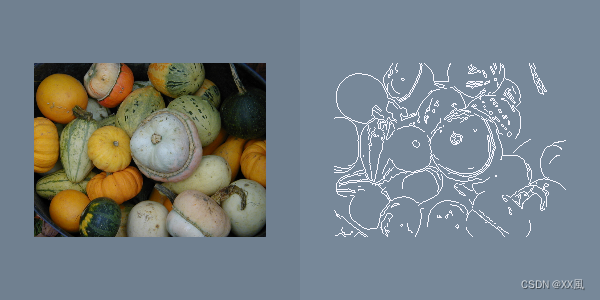
prj name: CannyEdgeDetector
cpp
# include <vtkCamera.h>
# include <vtkGeometryFilter.h>
# include <vtkImageActor.h>
# include <vtkImageCast.h>
# include <vtkImageConstantPad.h>
# include <vtkImageGaussianSmooth.h>
# include <vtkImageGradient.h>
# include <vtkImageLuminance.h>
# include <vtkImageMagnitude.h>
# include <vtkImageNonMaximumSuppression.h>
# include <vtkImageToStructuredPoints.h>
# include <vtkLinkEdgels.h>
# include <vtkNamedColors.h>
# include <vtkNew.h>
# include <vtkPNGReader.h>
# include <vtkPolyDataMapper.h>
# include <vtkProperty.h>
# include <vtkRenderWindow.h>
# include <vtkRenderWindowInteractor.h>
# include <vtkRenderer.h>
# include <vtkStripper.h>
# include <vtkSubPixelPositionEdgels.h>
# include <vtkThreshold.h>

int main(int argc, char* argv[])
{
  vtkNew<vtkNamedColors> colors;

  if (argc != 2)
  {
    std::cerr << "Required args: filename.png e.g. Gourds.png" << std::endl;
    return EXIT_FAILURE;
  }

  std::string filename = argv[1];
  std::cout << filename << std::endl;
  // Define viewport ranges
  // (xmin, ymin, xmax, ymax)
  double originalViewport[4] = {0.0, 0.0, 0.5, 1.0};
  double edgeViewport[4] = {0.5, 0.0, 1.0, 1.0};

  vtkNew<vtkRenderer> originalRenderer;
  originalRenderer->SetViewport(originalViewport);
  originalRenderer->SetBackground(colors->GetColor3d("SlateGray").GetData());
  vtkNew<vtkRenderer> edgeRenderer;
  edgeRenderer->SetViewport(edgeViewport);
  edgeRenderer->SetBackground(colors->GetColor3d("LightSlateGray").GetData());

  vtkNew<vtkRenderWindow> renderWindow;
  renderWindow->SetSize(600, 300);
  renderWindow->SetMultiSamples(0);
  renderWindow->AddRenderer(originalRenderer);
  renderWindow->AddRenderer(edgeRenderer);
  renderWindow->SetWindowName("CannyEdgeDetector");

  vtkNew<vtkRenderWindowInteractor> interactor;
  interactor->SetRenderWindow(renderWindow);

  vtkNew<vtkPNGReader> imageIn;
  imageIn->SetFileName(filename.c_str());
  imageIn->Update();

  vtkNew<vtkImageActor> imageActor;
  imageActor->SetInputData(imageIn->GetOutput());

  originalRenderer->AddActor(imageActor);

  vtkNew<vtkImageLuminance> il;
  il->SetInputConnection(imageIn->GetOutputPort());

  vtkNew<vtkImageCast> ic;
  ic->SetOutputScalarTypeToFloat();
  ic->SetInputConnection(il->GetOutputPort());

  // Smooth the image.
  vtkNew<vtkImageGaussianSmooth> gs;
  gs->SetInputConnection(ic->GetOutputPort());
  gs->SetDimensionality(2);
  gs->SetRadiusFactors(1, 1, 0);

  // Gradient the image.
  vtkNew<vtkImageGradient> imgGradient;
  imgGradient->SetInputConnection(gs->GetOutputPort());
  imgGradient->SetDimensionality(2);

  vtkNew<vtkImageMagnitude> imgMagnitude;
  imgMagnitude->SetInputConnection(imgGradient->GetOutputPort());

  // Non maximum suppression.
  vtkNew<vtkImageNonMaximumSuppression> nonMax;
  imgMagnitude->Update();
  nonMax->SetMagnitudeInputData(imgMagnitude->GetOutput());
  imgGradient->Update();
  nonMax->SetVectorInputData(imgGradient->GetOutput());
  nonMax->SetDimensionality(2);

  vtkNew<vtkImageConstantPad> pad;
  pad->SetInputConnection(imgGradient->GetOutputPort());
  pad->SetOutputNumberOfScalarComponents(3);
  pad->SetConstant(0);

  vtkNew<vtkImageToStructuredPoints> i2sp1;
  i2sp1->SetInputConnection(nonMax->GetOutputPort());
  pad->Update();
  i2sp1->SetVectorInputData(pad->GetOutput());

  // Link edgles.
  vtkNew<vtkLinkEdgels> imgLink;
  imgLink->SetInputConnection(i2sp1->GetOutputPort());
  imgLink->SetGradientThreshold(2);

  // Threshold links.
  vtkNew<vtkThreshold> thresholdEdges;
  thresholdEdges->SetInputConnection(imgLink->GetOutputPort());
  thresholdEdges->SetUpperThreshold(10);
  thresholdEdges->SetThresholdFunction(vtkThreshold::THRESHOLD_UPPER);
  thresholdEdges->AllScalarsOff();

  vtkNew<vtkGeometryFilter> gf;
  gf->SetInputConnection(thresholdEdges->GetOutputPort());

  vtkNew<vtkImageToStructuredPoints> i2sp;
  i2sp->SetInputConnection(imgMagnitude->GetOutputPort());
  pad->Update();
  i2sp->SetVectorInputData(pad->GetOutput());

  // Subpixel them.
  vtkNew<vtkSubPixelPositionEdgels> spe;
  spe->SetInputConnection(gf->GetOutputPort());
  i2sp->Update();
  spe->SetGradMapsData(i2sp->GetStructuredPointsOutput());

  vtkNew<vtkStripper> strip;
  strip->SetInputConnection(spe->GetOutputPort());

  vtkNew<vtkPolyDataMapper> dsm;
  dsm->SetInputConnection(strip->GetOutputPort());
  dsm->ScalarVisibilityOff();

  vtkNew<vtkActor> planeActor;
  planeActor->SetMapper(dsm);
  planeActor->GetProperty()->SetAmbient(1.0);
  planeActor->GetProperty()->SetDiffuse(0.0);
  planeActor->GetProperty()->SetColor(
      colors->GetColor3d("GhostWhite").GetData());

  // Add the actors to the renderer, set the background and size.
  edgeRenderer->AddActor(planeActor);

  // Render the image.
  interactor->Initialize();
  renderWindow->Render();
  renderWindow->Render();

  interactor->Start();

  return EXIT_SUCCESS;
}