vtkActor添加鼠标悬浮显示提示_tip功能
开发环境:
Windows 11 家庭中文版
Microsoft Visual Studio Community 2019
demo解决问题: 给vtkActor对象设置一个文本,在鼠标悬浮时进行显示
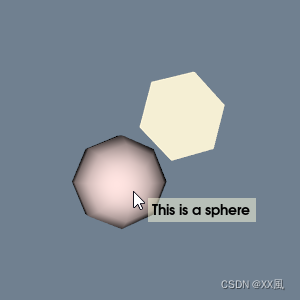
- tip控件关键代码
cpp
  // Create the widget.
  vtkNew<vtkBalloonRepresentation> balloonRep;
  balloonRep->SetBalloonLayoutToImageRight();

  vtkNew<vtkBalloonWidget> balloonWidget;
  balloonWidget->SetInteractor(iRen);
  balloonWidget->SetRepresentation(balloonRep);
  balloonWidget->AddBalloon(sphereActor, "This is a sphere", nullptr);
  balloonWidget->AddBalloon(regularPolygonActor, "This is a regular polygon",
nullptr);- 五边形创建对象
vtkRegularPolygonSource
prj name: BalloonWidget
cpp
# include <vtkActor.h>
# include <vtkBalloonRepresentation.h>
# include <vtkBalloonWidget.h>
#