锚定3D空间对象位置并标注
开发环境:
- Windows 11 家庭中文版
- Microsoft Visual Studio Community 2019
- VTK-9.3.0.rc0
- vtk-example
demo解决问题:在渲染场景中进行交互式定位,并与特定对象或位置相关联,增强了3D数据的可视化。它提供了设置标题文本、自定义外观以及在3D空间中锚定其位置的功能。 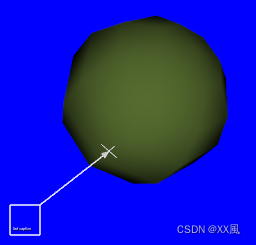
关键点:
- vtkCaptionWidget可以在渲染场景中进行交互式定位,并与特定对象或位置相关联,增强了3D数据的可视化。它提供了设置标题文本、自定义外观以及在3D空间中锚定其位置的功能。这个小部件常用于工程可视化应用程序中,用于标记和注释3D可视化,使底层数据更清晰地呈现和演示。
cpp
  // Create the widget and its representation.
  vtkNew<vtkCaptionRepresentation> captionRepresentation;
  captionRepresentation->GetCaptionActor2D()->SetCaption("Test caption");
  captionRepresentation->GetCaptionActor2D()
      ->GetTextActor()
      ->GetTextProperty()
      ->SetFontSize(100);

  double pos[3] = {.5, 0, 0};
  captionRepresentation->SetAnchorPosition(pos);

  vtkNew<vtkCaptionWidget> captionWidget;
  captionWidget->SetInteractor(renderWindowInteractor);
  captionWidget->SetRepresentation(captionRepresentation);
prj name: CaptionActor2D
cpp
# include <vtkActor.h>
// #include <vtkCallbackCommand.h>
# include <vtkCamera.h>
# include <vtkCaptionActor2D.h>
# include <vtkCaptionRepresentation.h>
# include <vtkCaptionWidget.h>
# include <vtkNamedColors.h>
# include <vtkNew.h>
// #include <vtkPolyData.h>
# include <vtkPolyDataMapper.h>
# include <vtkProperty.h>
# include <vtkRenderWindow.h>
# include <vtkRenderWindowInteractor.h>
# include <vtkRenderer.h>
# include <vtkSphereSource.h>
# include <vtkTextActor.h>
# include <vtkTextProperty.h>

int main(int, char*[])
{
  vtkNew<vtkNamedColors> colors;

  // Sphere
  vtkNew<vtkSphereSource> sphereSource;
  sphereSource->Update();

  vtkNew<vtkPolyDataMapper> mapper;
  mapper->SetInputConnection(sphereSource->GetOutputPort());

  vtkNew<vtkActor> actor;
  actor->SetMapper(mapper);
  actor->GetProperty()->SetColor(
      colors->GetColor3d("DarkOliveGreen").GetData());

  // A renderer and render window.
  vtkNew<vtkRenderer> renderer;
  vtkNew<vtkRenderWindow> renderWindow;
  renderWindow->AddRenderer(renderer);
  renderWindow->SetWindowName("CaptionWidget");

  // An interactor
  vtkNew<vtkRenderWindowInteractor> renderWindowInteractor;
  renderWindowInteractor->SetRenderWindow(renderWindow);

  // Create the widget and its representation.
  vtkNew<vtkCaptionRepresentation> captionRepresentation;
  captionRepresentation->GetCaptionActor2D()->SetCaption("Test caption");
  captionRepresentation->GetCaptionActor2D()
      ->GetTextActor()
      ->GetTextProperty()
      ->SetFontSize(100);

  double pos[3] = {.5, 0, 0};
  captionRepresentation->SetAnchorPosition(pos);

  vtkNew<vtkCaptionWidget> captionWidget;
  captionWidget->SetInteractor(renderWindowInteractor);
  captionWidget->SetRepresentation(captionRepresentation);

  // Add the actors to the scene.
  renderer->AddActor(actor);
  renderer->SetBackground(colors->GetColor3d("Blue").GetData());

  renderWindow->Render();

  // Rotate the camera to bring the point the caption is pointing to into view.
  renderer->GetActiveCamera()->Azimuth(90);

  captionWidget->On();

  // Begin mouse interaction
  renderWindowInteractor->Start();

  return EXIT_SUCCESS;
}