VTK示例:复用球体数据源与映射器的编程实践
开发环境:
- Windows 11 家庭中文版
- Microsoft Visual Studio Community 2019
- VTK-9.3.0.rc0
- vtk-example
- 参考代码
- 目的:学习与总结
demo解决问题:复用球体数据源、映射器,vtkSmartPointer与std::vector、vtkNew与std::array的搭配使用
知识点
- 自定义namedColor
cpp
  // Set the background color.
  std::array<unsigned char, 4> bkg{{26, 51, 102, 255}};
colors->SetColor("bkg", bkg.data());- 数据源及映射器的复用;actor的分组机制
actor 是一种分组机制:除了几何体(映射器)之外,它还还具有属性、变换矩阵和/或纹理贴图。 在此示例中,我们创建了八个不同的球体(两行,每行四个球体)球体, 并设置环境照明系数。有点环境感打开,因此球体的背面不会完全变黑。
cpp
spheres[i]->SetMapper(sphereMapper);
spheres[i]->GetProperty()->SetColor(colors->GetColor3d("Red").GetData());
spheres[i]->GetProperty()->SetAmbient(ambient);
spheres[i]->GetProperty()->SetDiffuse(diffuse);
spheres[i]->GetProperty()->SetSpecular(specular);
spheres[i]->AddPosition(position.data());- vtkSmartPointer与std::vector、vtkNew与std::array搭配使用
由于我们对所有八个球体都使用相同的球体源和映射器,因此我们将使用一个 std::array 来保存 actor。 如果你想/需要使用 std::vector,那么你必须使用 std::vector<vtkSmartPointer> spheres; 然后,在循环中使用 spheres.push_back(vtkSmartPointer::New()) 创建对象; 原因: 与 vtkSmartPointer 相比,vtkNew 没有赋值运算符或复制构造函数,并且在其整个生命周期内拥有一个对象。 因此,vtkNew 不满足其他 std 所需的 CopyAssignable 和 CopyConstructible 要求
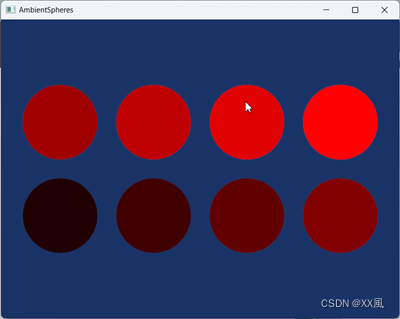
项目名称: AmbientSpheres
cpp
# include <vtkActor.h>
# include <vtkCamera.h>
# include <vtkLight.h>
# include <vtkNamedColors.h>
# include <vtkNew.h>
# include <vtkPolyDataMapper.h>
# include <vtkProperty.h>
# include <vtkRenderWindow.h>
# include <vtkRenderWindowInteractor.h>
# include <vtkRenderer.h>
# include <vtkSphereSource.h>

# include <array>
# include <iostream>

int main(int, char*[])
{
  vtkNew<vtkNamedColors> colors;

  // Set the background color.
  std::array<unsigned char, 4> bkg{{26, 51, 102, 255}};
  colors->SetColor("bkg", bkg.data());

  // The following lines create a sphere represented by polygons.
  vtkNew<vtkSphereSource> sphere;
  sphere->SetThetaResolution(100);
  sphere->SetPhiResolution(50);

  // The mapper is responsible for pushing the geometry into the graphics library.
  vtkNew<vtkPolyDataMapper> sphereMapper;
  sphereMapper->SetInputConnection(sphere->GetOutputPort());

  // In this example we create eight different spheres (two rows of four spheres)
  // and set the ambient lighting coefficients.
  // Since we are using the same sphere source and mapper for all eight spheres
  // we will use a std::array holding the actors.
  //
  // If you want/need to use std::vector, then you must use:
  // std::vector<vtkSmartPointer<vtkActor>> spheres;
  // and then, in a loop, create the object using spheres.push_back(vtkSmartPointer<vtkActor>::New());
  //
  // The reason:
  // vtkNew, in contrast to vtkSmartPointer, has no assignment operator
  // or copy constructor and owns one object for its whole lifetime.
  // Thus vtkNew does not satisfy the CopyAssignable and CopyConstructible
  // requirements needed for other std containers like std::vector or std::list.
  // std::array, on the other hand, is a container encapsulating fixed size
  // arrays so its elements do not need to be CopyAssignable and CopyConstructible.

  auto const numberOfSpheres = 8;
  std::array<vtkNew<vtkActor>, numberOfSpheres> spheres;
  auto ambient = 0.125;
  auto diffuse = 0.0;
  auto specular = 0.0;
  std::array<double, 3> position{{0, 0, 0}};
  for (size_t i = 0; i < spheres.size(); ++i)
  {
    spheres[i]->SetMapper(sphereMapper);
    spheres[i]->GetProperty()->SetColor(colors->GetColor3d("Red").GetData());
    spheres[i]->GetProperty()->SetAmbient(ambient);
    spheres[i]->GetProperty()->SetDiffuse(diffuse);
    spheres[i]->GetProperty()->SetSpecular(specular);
    spheres[i]->AddPosition(position.data());
    ambient += 0.125;
    position[0] += 1.25;
    if (i == 3)
    {
      position[0] = 0;
      position[1] = 1.25;
    }
  }

  // Create the graphics structure.
  vtkNew<vtkRenderer> ren;
  vtkNew<vtkRenderWindow> renWin;
  renWin->AddRenderer(ren);
  vtkNew<vtkRenderWindowInteractor> iren;
  iren->SetRenderWindow(renWin);

  // Add the actors to the renderer, set the background and size.
  for (int i = 0; i < numberOfSpheres; ++i)
  {
    ren->AddActor(spheres[i]);
  }

  ren->SetBackground(colors->GetColor3d("bkg").GetData());
  renWin->SetSize(640, 480);
  std::cout << "DPI: " << renWin->GetDPI() << std::endl;
  renWin->SetWindowName("AmbientSpheres");

  // Set up the lighting.
  vtkNew<vtkLight> light;
  light->SetFocalPoint(1.875, 0.6125, 0);
  light->SetPosition(0.875, 1.6125, 1);
  ren->AddLight(light);

  // We want to eliminate perspective effects on the apparent lighting.
  // Parallel camera projection will be used.
  ren->GetActiveCamera()->SetFocalPoint(0, 0, 0);
  ren->GetActiveCamera()->SetPosition(0, 0, 1);
  ren->GetActiveCamera()->SetViewUp(0, 1, 0);
  ren->GetActiveCamera()->ParallelProjectionOn();
  ren->ResetCamera();
  ren->GetActiveCamera()->SetParallelScale(2.0);
  // This starts the event loop and invokes an initial render.
  //
  iren->Initialize();
  renWin->Render();
  iren->Start();

  return EXIT_SUCCESS;
}